
Leave calendar helps you plan!
Most companies work with multiple planners. As it usually goes now, planners send each other information on WhatsApp or via email when a trucker has informed them that he is going on leave.
One planning is aware, the other planning has not seen the message. This creates problems and sometimes stress to appoint a replacement at the last minute.
Trans-IT has come up with something for this.

Automatically set leave period to ‘unavailable’.
A trucker (employee or subcontractor) communicates his leave to a planner or HR employee.
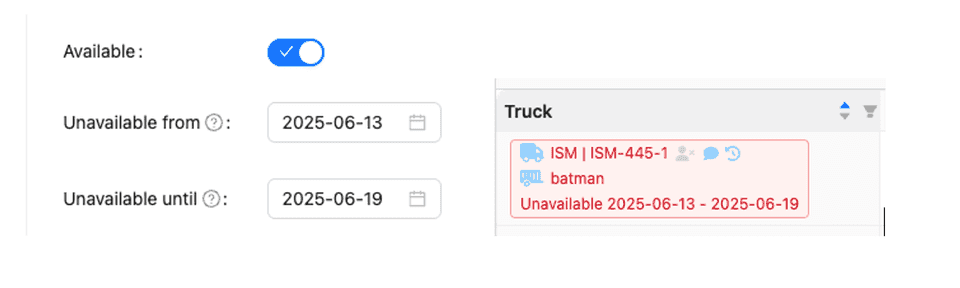
With our leave calendar you can set this holiday period to ‘not available’ in your planning.
Suppose you do the planning on the 11th of the month for a trip on the 13th and a certain trucker goes on leave on the 13th. On the 11th he will still be visible. But our system warns you that this trucker will not be present on that trip day.
One less margin of error!
The moment this trucker is on holiday (so from 0.01h on the 13th of the month) this trucker is automatically removed from the list of license plates that can be added to trips.
As the example shows, this trucker is only available again on the 20th. So if you do the planning on the 18th for a trip on the 20th, our holiday calendar will show him.
This convenience is also built into our planning system.
Would you also like this application for your company?
More info or a demo?
Contact Lars.
lars@trans-it.be

How often is Kaai 1700 mentioned in your schedule?
When we onboard a customer to our system from another TMS, we receive a list of locations that we need to integrate into our TMS in preparation for our new customer.
We regularly notice that frequently used locations have sometimes been created five to seven times over the years with their previous TMS package. All with a different name: Kaai1700, Kaai 1700, kaai 1700, AGW, Haven kaai 1700, … each time with the same address. That is not the intention. It causes confusion and unnecessary data space that slows down your system.
We have found a solution for this. If you create a new location as a planner or order handler, our Nearby Locator will search your location file for nearby locations.
Before you want to create the location definitively, our Nearby Locator will show a pop-up window with an existing location with the same address or a few hundred meters away.
Nearby Locator: Verified with known dates and location.
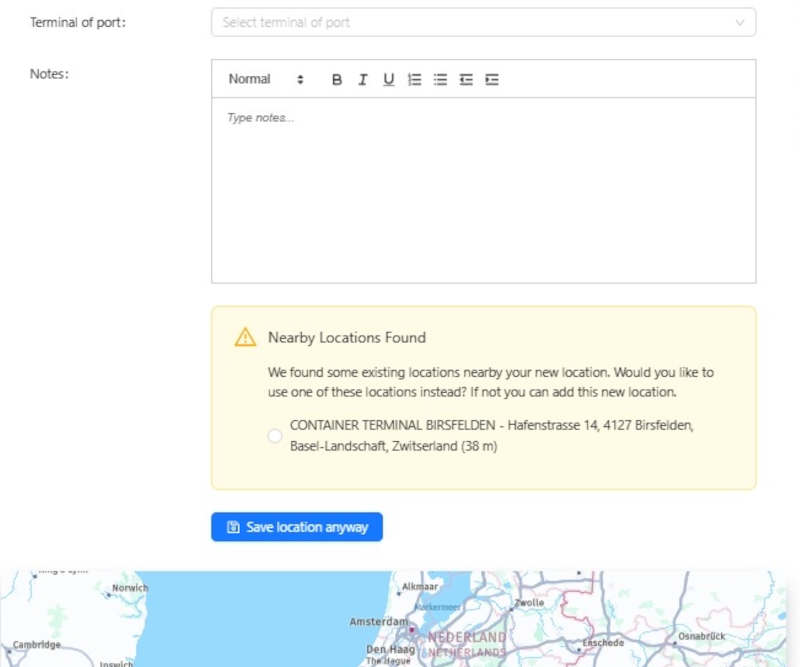
You can still choose whether you want to create this extra location or indicate the existing location for your order or planning.
This prevents your locations from becoming confusing and always conforms to the names that every planner in your company uses.
A small thing in our programming but a world of difference on the work floor. Keep your planning, quotes and orders clean and clear.
Request demo now! What are you waiting for?
Lars is ready for you!
lars@trans-it.be
We will bring you to a new future in the container transport world.
See you soon!