
Explained in a nutshell:
We’ve rolled out a new set of updates focused on making weekly purchasing faster and improving how tolls are applied to supplier pricing. Weekly Purchase Orders (by truck) + upgraded PDF You can now manage purchase orders per week with better visibility and control:
- View weekly orders per supplier, grouped by truck
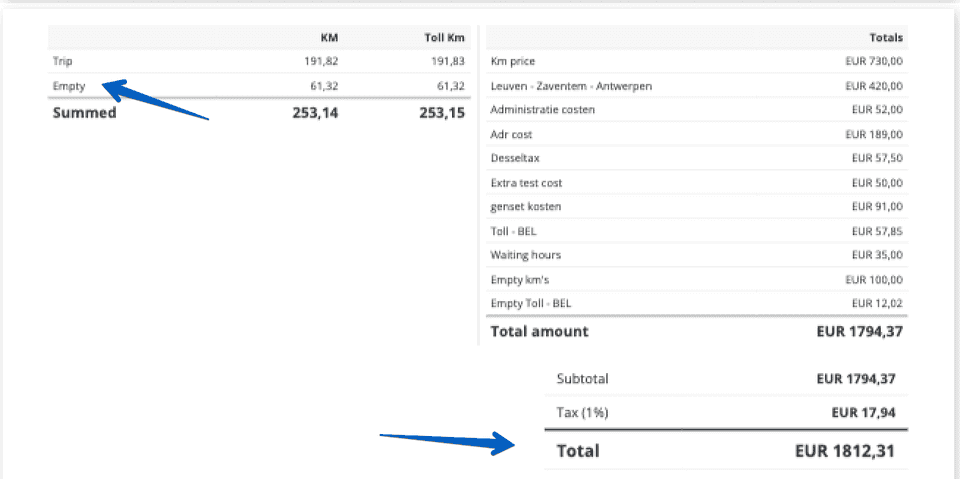
- Set and calculate empty-km pricing, km price, and toll costs
- Adjust and lock the order sequence per truck
- Generate weekly purchase orders for all supplier trucks in one action
Use the redesigned PDF: orders per truck (in your selected sequence), waypoint cost overview, truck-level summaries, and a full-week summary You’ll find this in the Weekly Purchase Orders area, and you can regenerate the PDF anytime from Purchase Order details.
Supplier toll settings (with disable option) Supplier prices now support a dedicated toll configuration:
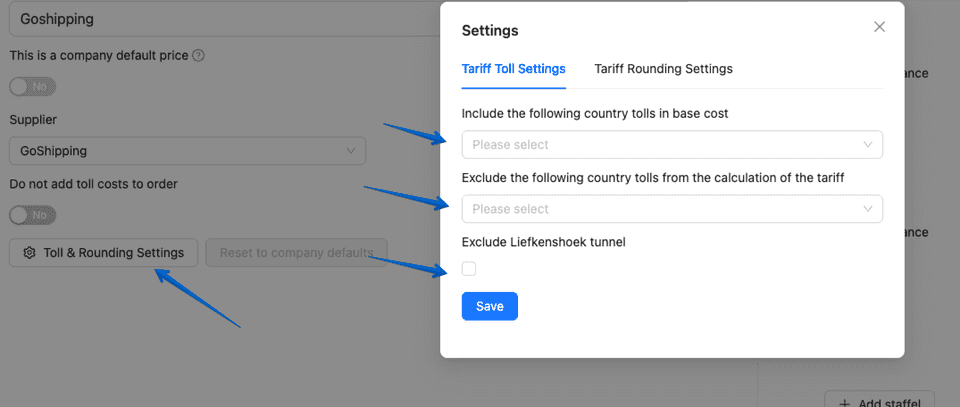
Choose which tolls are added to an order (aligned with customer tariff toll settings)
Disable toll costs entirely for supplier pricing when needed This is available directly in Supplier Prices under the new toll settings.
More info online at release notes:
https://app.trans-it.be/release-notes
Scroll naar 2026.05 (1/3/2026)
New Features & Improvements
- Supplier prices now include an option to disable toll costs.
- Supplier prices now include a toll settings panel to define which tolls are added to an order (works the same way as the customer tariff toll settings).
Purchase orders per week:
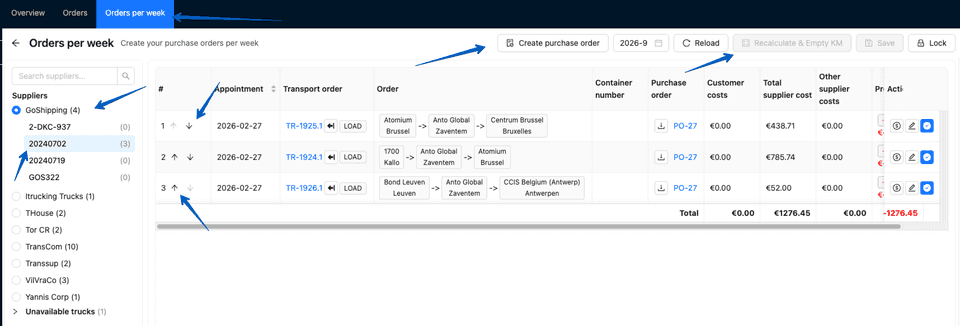
- Users can set an empty-km price in the supplier profile and in the purchase order company settings.
- New page to view weekly orders by supplier, grouped by truck.
- Users can update the order sequence per truck.
- Users can lock the order sequence.
- Users can calculate order km price, toll price, and empty-km prices including tolls.
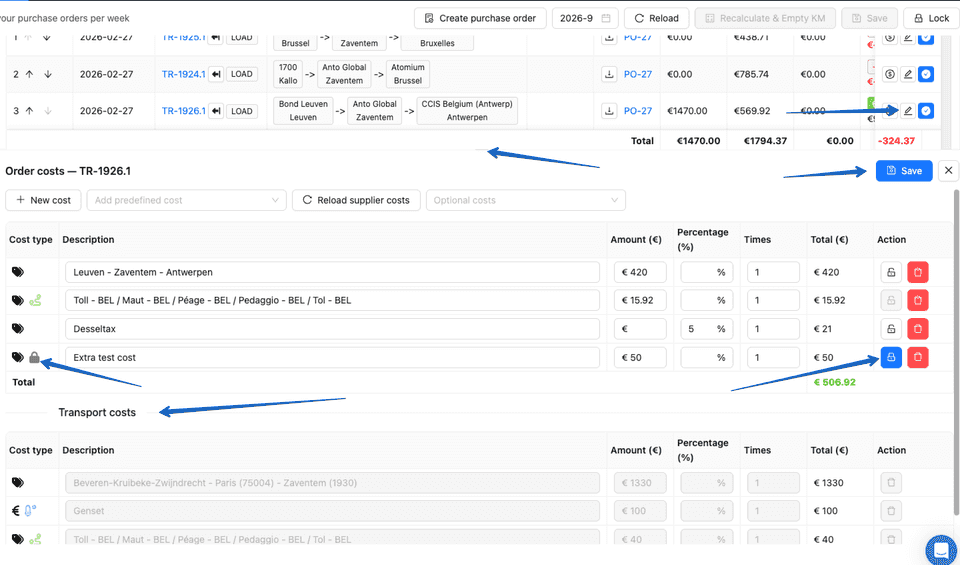
- Users can update order costs quickly using a cost splitter view. The splitter displays a list of transport costs and is read-only.
- User can lock cost item to prevent overwritten by systeem.
- Users can create weekly purchase orders for all supplier trucks in one action.
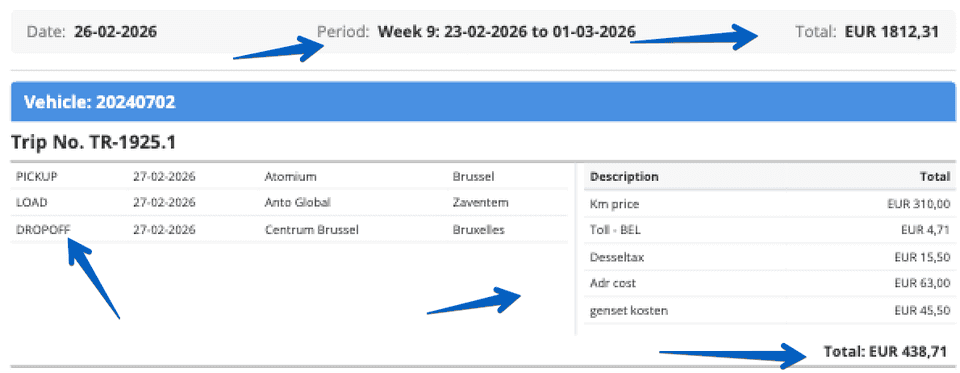
New PDF design for weekly purchase orders
- Orders are grouped per truck in the user-defined sequence.
- The PDF includes a waypoint overview with costs.
- Each truck includes a weekly summary of orders.
- The final PDF includes a full-week summary.
- Users can regenerate the PDF from purchase order details.
Extra and good to know:
- The web application is now available in Bulgarian.
- Application load time has been optimized; the initial load is now faster.
- Added a shortcut button to transport customer costs in the Transports Overview and Planning screens.
- Transport cost exports now include order costs, supplier name, supplier accounting code, and truck license plate.
- Added OBU number, fuel card number, PIN code, CVV, expiration date, and permit number to the truck details.
- The transport customer reference is now shown in the subject of the invoice email (only when the invoice contains a single customer reference).
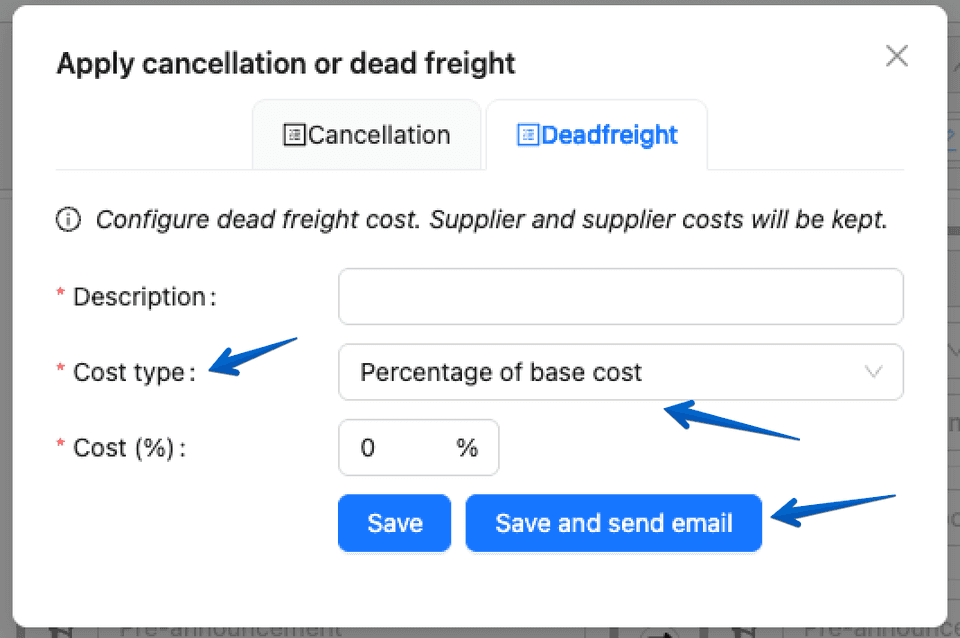
- When marking a transport as deadfreight, users can now charge a percentage of the customer base cost instead of entering a fixed amount. Also added option to send a mail to customer with updated cost.
- Removed the “General” step when creating a transport via CoPilot to reduce clicks.
- Added a shortcut to truck chat in Transport Planning (Action column).
- Users can now add BCC recipients when sending emails for improved control.
- Users can now send an email to all customers or all suppliers directly from the Customers or Suppliers overview pages.
- Manual status updates now include an Import/Export column, and users can send emails directly from Trans-IT instead of downloading.
More info online at release notes:
https://app.trans-it.be/release-notes
Scroll naar 2026.05 (1/3/2026)
Sign up !
More info about Trans-IT and Market Place!
Send a mail with title Trans-IT & Market Place to:
lars@trans-it.be
And provide your company name, address, phone number, email, …
We will contact you and activate your account!